
ICE Buddy for your Menu Bar
ICE Buddy gives you one-click access to train journey information from your Mac’s menu bar while you travel on an ICE connected to WiFionICE.
by riedel.wtf apps S.L.
What you get
You can check your ICE journey without leaving your Mac.
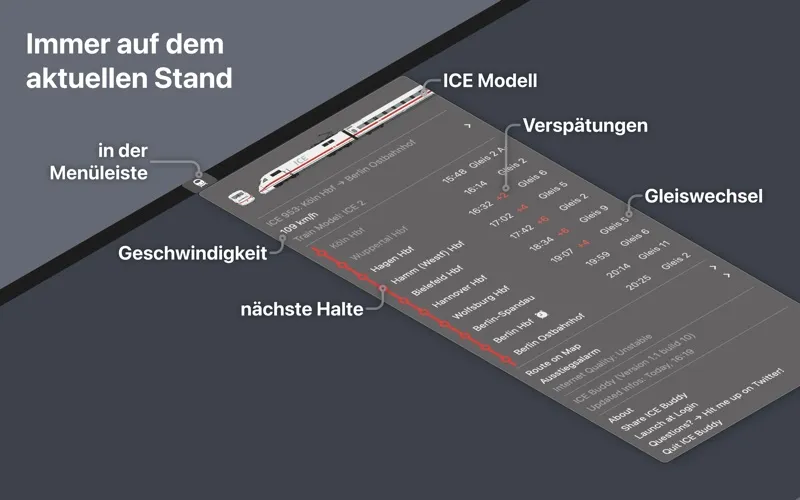
With ICE Buddy, you can check your next stops, delays, track changes, and current train speed from your Mac’s menu bar. One click brings up the journey information, so you can see what is happening on your trip while you work on your computer.
You can check which stop is coming up when you need to prepare to get off, or look for delays and track changes as your journey progresses. If you are curious about how fast you are travelling, you can check that in the same place.
You need to be aboard an ICE 1, ICE 2, ICE 3, or ICE 4 and connect your Mac to the WiFionICE network for the app to work. You get an onboard companion for checking your current journey rather than a tool for planning travel before you board.
-
Know your next stop
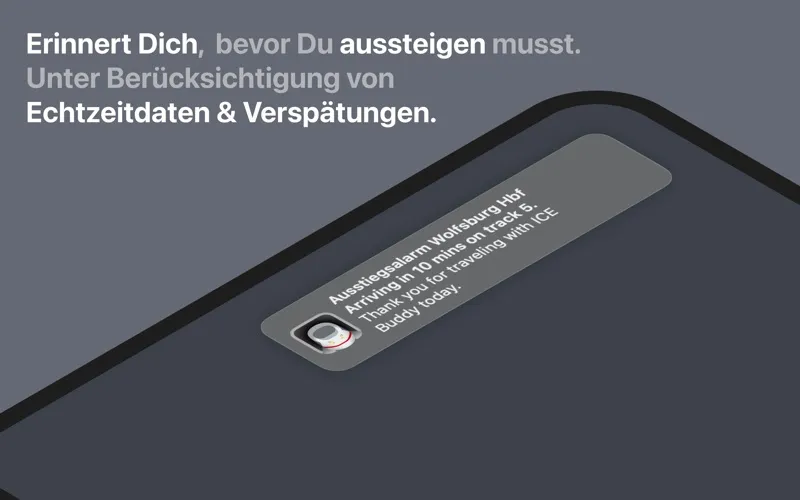
You can check upcoming stops while working, so you know when to prepare to get off.
-
Check journey changes
You can see delays and track changes from your menu bar during your ICE trip.
-
See your current speed
You can find out how fast your train is travelling alongside the other journey details.
-
Keep information close
You can bring up your train’s travel information with one click while using your Mac.
Best for
- You work on your Mac during ICE journeys
- You want quick access to stops, delays, and track changes aboard an ICE
Skip it if
You do not need it if you rarely travel on supported ICE trains or cannot connect to WiFionICE.
Screenshots
From the developer
ICE Buddy – see all the relevant travel info in your menu bar: Next stops, delays, track changes, current speed. With one click. All the info you need, while you work on your computer on the ICE.Read the full description
Alternatives to ICE Buddy for your Menu Bar
Other apps to plan trips. See all