
Shiny
One-tap memory cleanup with a live memory-pressure readout in your menu bar.
Shiny is a menu-bar memory cleanup app for when your Mac slows down. You can check memory pressure, free RAM, and control unwanted startup and background apps.
by THEODORE HQ
What you get
You can free memory and cut back on unwanted background apps.
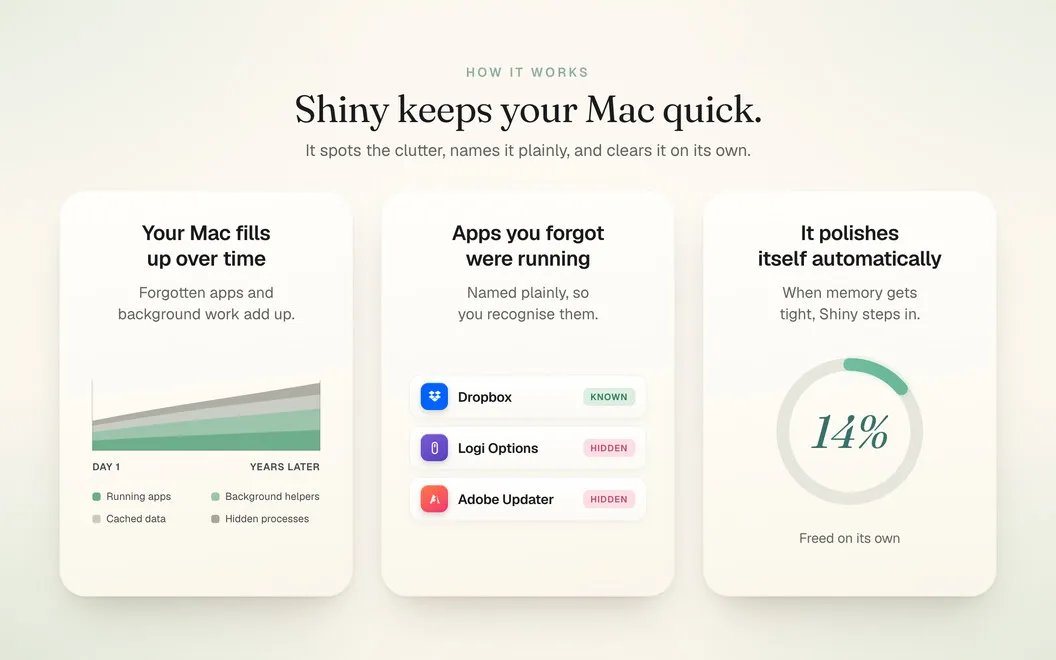
Shiny gives you a quick way to free RAM when your Mac feels sluggish, without restarting or searching through Activity Monitor. You can trigger a cleanup before opening a demanding app or starting a large export, giving that work more available memory.
You can also see memory pressure in your menu bar rather than waiting for slowdowns to interrupt you. When available memory gets particularly low, a glow at the edges of your screen gives you another cue to act. It disappears once memory is available again.
Beyond cleanup, you can review apps that run at startup or in the background and pause or remove unwanted entries. That gives you more control over what runs without your attention. Shiny stays in your menu bar without adding a Dock icon, and you can use it without an account, analytics, or sending your information off your Mac.
-
Free RAM before demanding work
You can clear memory before opening a large app or starting an export, without restarting your Mac.
-
Notice memory pressure early
You can check a live menu-bar gauge and catch low-memory conditions through a screen-edge glow.
-
Reduce unwanted background activity
You can review startup and background apps, then pause or remove entries you do not want running.
-
Keep your information local
You can use Shiny without creating an account, sharing analytics, or sending your information off your Mac.
Best for
- You notice slowdowns when several apps are open
- You want to free RAM before demanding apps or exports
- You want control over unwanted startup and background apps
Skip it if
You probably do not need Shiny if your Mac stays responsive and you already manage its startup and background apps.
Screenshots


From the developer
Shiny hands back the speed macOS quietly lets slip. When your Mac starts to drag, one click clears the memory your apps are hoarding and it feels awake again, no restart, no digging through Activity Monitor.Read the full description
Alternatives to Shiny
Other apps to speed up your Mac. See all
 QuitAll
Speed up Mac by quitting all apps
Setapp
98% · 1,841 ratings
QuitAll
Speed up Mac by quitting all apps
Setapp
98% · 1,841 ratings
 App Tamer
Reduce CPU usage
Setapp
95% · 684 ratings
App Tamer
Reduce CPU usage
Setapp
95% · 684 ratings
 Aion
Close idle apps automatically
Setapp
Aion
Close idle apps automatically
Setapp
 CleanMyMac
Tidy up your Mac
Setapp
97% · 18,514 ratings
CleanMyMac
Tidy up your Mac
Setapp
97% · 18,514 ratings
 iStat Menus
Track CPU, GPU, sensors, etc.
Setapp
96% · 5,527 ratings
iStat Menus
Track CPU, GPU, sensors, etc.
Setapp
96% · 5,527 ratings
 Mission Control Plus
Close windows from Mission Control
Setapp
97% · 1,077 ratings
Mission Control Plus
Close windows from Mission Control
Setapp
97% · 1,077 ratings