CopyClip
Clipboard History
CopyClip is a Mac clipboard manager for when you need text you copied earlier. You can find previous copies and cuts from your menu bar.
by FIPLAB Ltd
What you get
Find text you copied earlier, even after copying something else.
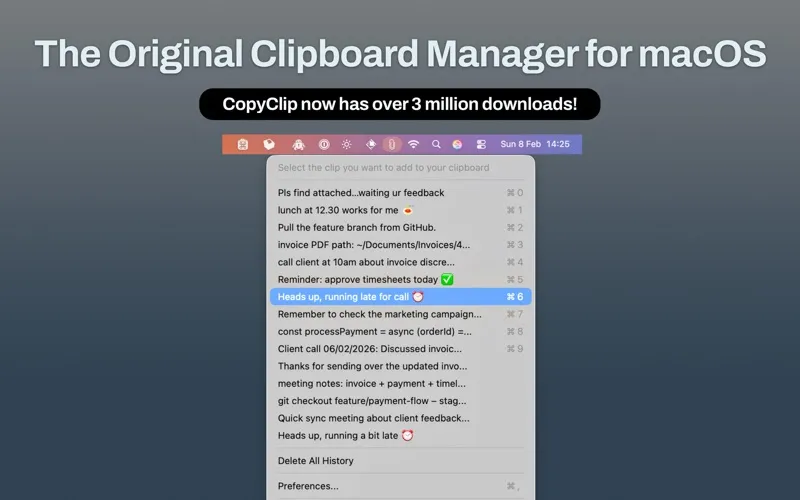
CopyClip gives you a history of what you copy or cut on your Mac, so you can return to an earlier snippet instead of tracking down its source again. When you copy several pieces of text in a row, you don’t have to rely only on the most recent one.
You access that history from your menu bar, where CopyClip runs in the background. If you’ve moved on from a passage and later realize you still need it, you can look through your clipboard history to find it. It’s useful when your work involves moving text between documents or collecting passages you’ll need again.
-
Recover earlier text
You can find a previous snippet after copying something new.
-
Avoid retracing your steps
You can return to copied text without locating the original document or page again.
-
Keep cut text accessible
Your history includes text you cut as well as text you copy.
-
Reach history while working
You can access your clipboard history from your Mac’s menu bar.
Best for
- You frequently move text between documents
- You copy several passages before returning to them
- You often need a snippet you copied earlier
Skip it if
You don’t need it if you only paste your most recent copy and rarely return to earlier text.
Screenshots
From the developer
CopyClip is the simplest and most efficient clipboard manager for your Mac. Running discreetly from your menu bar, this app stores all that you have copied or cut in the past, allowing you to quickly find that snippet of text you've been looking for.Read the full description
Alternatives to CopyClip
Other apps to keep clipboard history. See all
 Paste
Never lose anything you copy
Setapp
98% · 7,204 ratings
Paste
Never lose anything you copy
Setapp
98% · 7,204 ratings
 Unclutter
Manage files, notes, clipboard
Setapp
98% · 651 ratings
Unclutter
Manage files, notes, clipboard
Setapp
98% · 651 ratings
 Quip
Smart clipboard manager
Setapp
67% · 48 ratings
Quip
Smart clipboard manager
Setapp
67% · 48 ratings
 PasteJet
Smarter clipboard, faster pasting
Sold separately
PasteJet
Smarter clipboard, faster pasting
Sold separately
 PastePlop
Your clipboard, in a grid
Sold separately
PastePlop
Your clipboard, in a grid
Sold separately
 SaneClip
Private clipboard history
Sold separately
SaneClip
Private clipboard history
Sold separately