DevCleaner for Xcode
DevCleaner for Xcode helps you inspect and remove accumulated Xcode files, especially if you develop on a Mac with limited SSD storage.
by One Minute Games
What you get
You get storage back by clearing accumulated Xcode files.
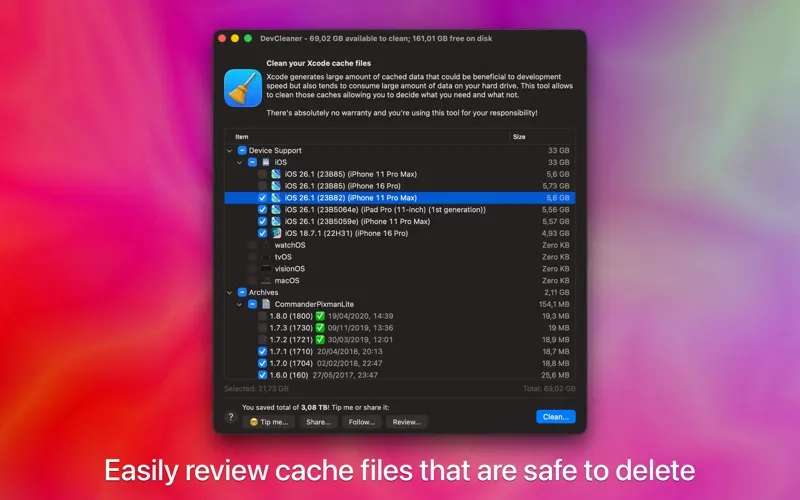
You can reclaim storage taken up by Xcode’s auto-generated files, caches, and symbols. These files can accumulate in your ~/Library/Developer folder without being cleared over time, sometimes occupying tens of gigabytes. If your Mac has a small SSD, removing that buildup can give you more room for other files.
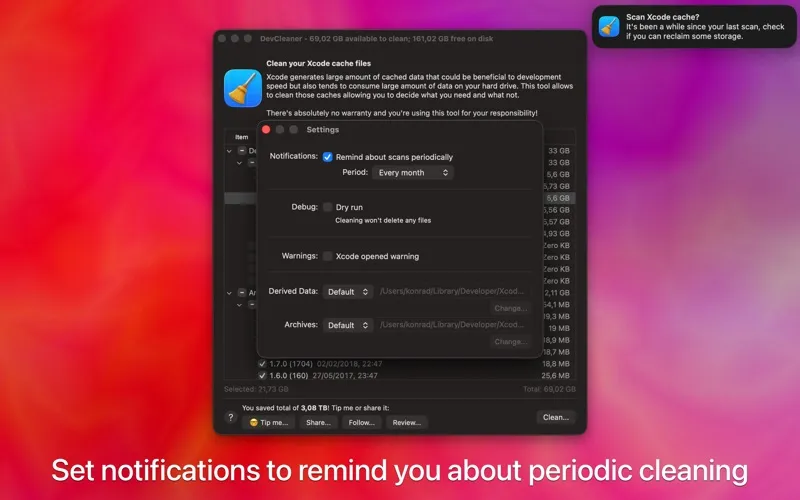
You can inspect the generated files before deciding whether to clean them, rather than removing them without reviewing them. DevCleaner can also remind you to scan again later, so you don’t have to remember to check for new buildup yourself.
If you already use scripts for maintenance, you can add Xcode cleanup to that routine through the included command-line tool. You get a choice between reviewing files in the app and including cleaning in your scripted workflow.
-
Reclaim Xcode storage
You can recover space occupied by accumulated caches, symbols, and other generated files.
-
Inspect before cleaning
You can review auto-generated files before deciding whether to remove them.
-
Remember future checks
You can receive reminders to scan again as Xcode files accumulate.
-
Add cleanup to scripts
You can include cleaning in your existing maintenance scripts using the command-line tool.
Best for
- You develop with Xcode on a small SSD
- You want to inspect accumulated Xcode files before cleaning
- You maintain your Mac with scripts
Skip it if
You don’t need it if you don’t use Xcode or its generated files aren’t taking up storage you need.
Screenshots
From the developer
If you want to reclaim tens of gigabytes of your storage used for various Xcode caches - this tool is for you! Xcode could store tens of gigabytes in ~/Library/Developer folder.Read the full description
Alternatives to DevCleaner for Xcode
Other apps to free up disk space. See all
 CleanMyMac
Tidy up your Mac
Setapp
97% · 18,514 ratings
CleanMyMac
Tidy up your Mac
Setapp
97% · 18,514 ratings
 App Archiver
Free up disk space with app optimization, archiving, and easy backup restoration
Sold separately
App Archiver
Free up disk space with app optimization, archiving, and easy backup restoration
Sold separately
 DiskMap
Visual disk map for Mac. Find what's eating your storage in seconds.
Sold separately
DiskMap
Visual disk map for Mac. Find what's eating your storage in seconds.
Sold separately
 DiskPress
Keep the files. Lose the bulk.
Sold separately
DiskPress
Keep the files. Lose the bulk.
Sold separately
 Mint
Storage optimizer: frees space without deleting files, then cleans with reasons.
Sold separately
Mint
Storage optimizer: frees space without deleting files, then cleans with reasons.
Sold separately
 Cleaner for Xcode
Mac App Store
Cleaner for Xcode
Mac App Store