
Leftovers
Sort files effortlessly
Leftovers is a Mac folder organizer for you if downloads and other files tend to pile up. You review files one at a time and decide what stays, moves, or goes.
by AppHouseKitchen GmbH
What you get
You get tidier folders by deciding what to keep, move, or trash.
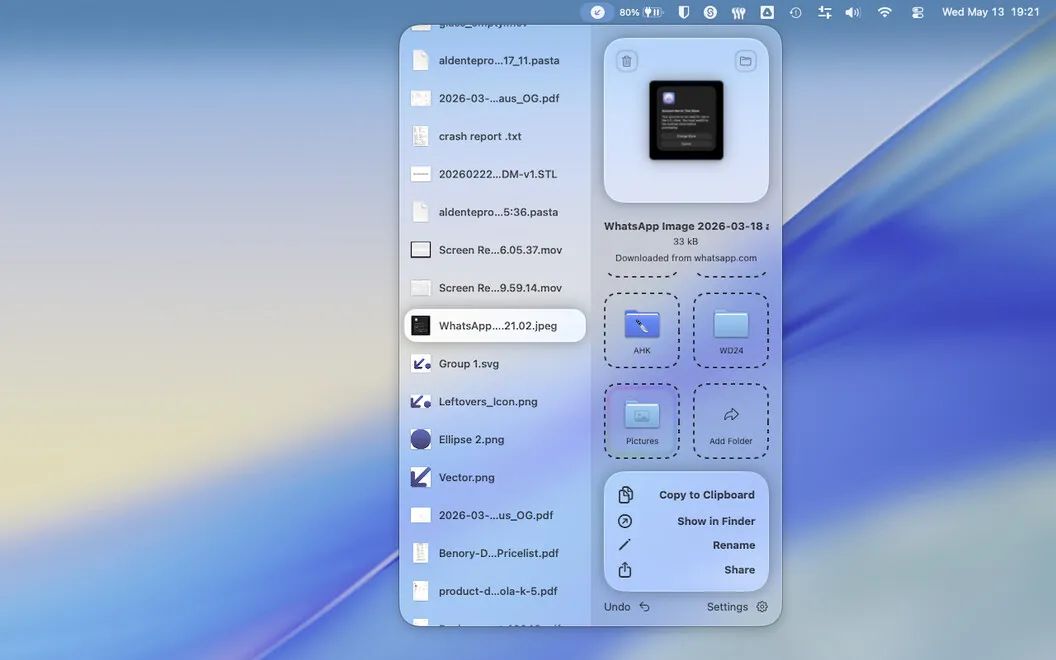
You can clear a crowded Downloads folder by reviewing files one at a time rather than sorting through everything in Finder. Swipe left to trash something, right to keep it, or drop it into another folder. You make a decision about each file, so old installers and unwanted documents don't keep sitting beside things you need.
You can also handle new downloads before they become another backlog. A popup in the notch prompts you a few seconds after a file arrives, giving you the choice to deal with it or snooze it until later. When you need to rename, copy, or share a file, you can do that without opening Finder.
You're not limited to Downloads: you can use the same process for your Desktop, screenshots, or project folders. If you make the wrong choice, you can undo any action. Leftovers collects no data from you.
-
Clear your file backlog
You work through files individually, keeping what matters and moving or trashing the rest.
-
Catch new downloads early
You get a notch prompt shortly after a download arrives, so you can sort it now or snooze it.
-
Skip extra Finder trips
You can rename, copy, and share files directly while you sort.
-
Correct sorting mistakes
You can undo every action, including moving a file to the wrong folder or trashing it by mistake.
Best for
- You have months of unsorted downloads
- You want to sort downloads as they arrive
- You need to tidy Desktop or project folders
Skip it if
You don't need it if you already keep your folders tidy and prefer handling files in Finder.
Screenshots
From the developer
Leftovers is a downloads folder organizer for Mac. Your Downloads folder is probably a graveyard of old DMGs, random PDFs, and files you meant to sort out six months ago. Leftovers fixes that with a swipe — keep, trash, or move files one by one, without it feeling like a chore.Read the full description
Alternatives to Leftovers
Other apps to organize & clean up folders. See all
 Spotless
Auto-hide files and clean up
Setapp
74% · 84 ratings
Spotless
Auto-hide files and clean up
Setapp
74% · 84 ratings
 Refolder
A calmer way to sort files
Setapp
80% · 65 ratings
Refolder
A calmer way to sort files
Setapp
80% · 65 ratings
 File Architect
File structure builder for Mac
Sold separately
File Architect
File structure builder for Mac
Sold separately
 Tinyyy Sweep
Make "later" happen on its own
Sold separately
Tinyyy Sweep
Make "later" happen on its own
Sold separately
 Grida
Desktop Organizer
Mac App Store
Grida
Desktop Organizer
Mac App Store
 Meta
Music tag editor for macOS
Setapp
96% · 425 ratings
Meta
Music tag editor for macOS
Setapp
96% · 425 ratings