
Clock Screen Saver
live time
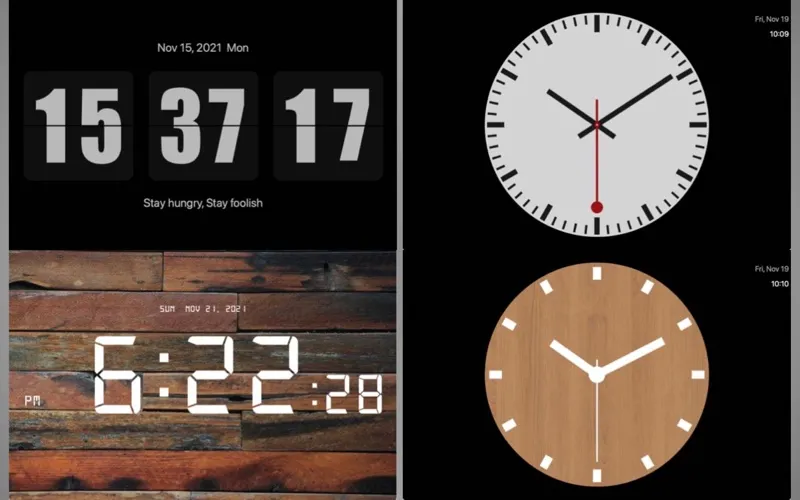
Clock Screen Saver gives you flip, LED digital, and analog clocks for your Mac’s screen saver, with options to personalize their appearance and displayed information.
by 书敏 贾
What you get
Turn your Mac’s screen saver into a clock that suits your style.
You get a clock to glance at whenever your Mac’s screen saver is showing. Choose a flip clock, an LED digital display, or an analog face, depending on how you prefer to read the time and what you want your screen to look like.
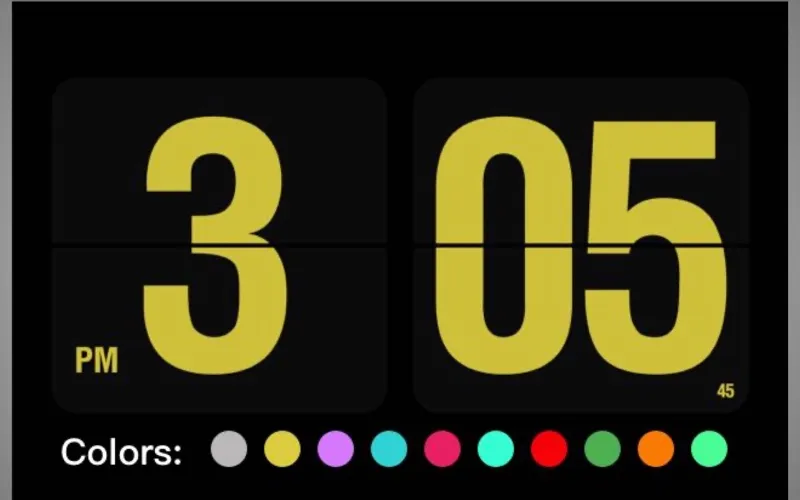
With the flip and LED styles, you can use 12- or 24-hour time and decide whether to include seconds and the date. You can also choose from different theme colors to change the display’s appearance.
For a personal touch, you can add a signature or message to the digital styles. If you prefer an analog clock, you can choose from several faces and add a title that serves as a note or signature.
-
Read time your way
You can choose a flip, LED digital, or analog clock for your screen saver.
-
Choose your time details
With flip and LED clocks, you can select 12- or 24-hour time and show or hide seconds and the date.
-
Match your preferred look
You can change digital theme colors or choose a different analog face.
-
Display a personal message
You can add a signature or note to digital clocks, or use an analog clock’s title for your text.
Best for
- You want a clock as your Mac’s screen saver
- You like personalizing clock colors and faces
- You want a short message alongside the time
Skip it if
You don’t need it if you’re happy with your current screen saver and only check the time in the menu bar.
Screenshots
From the developer
Clock Screen Saver, Provide a variety of clock screen saver downloads for MAC. Including flip clock, LED digital clock, analog clock face.Read the full description
Alternatives to Clock Screen Saver
Other apps to customize how your Mac looks. See all
 24 Hour Wallpaper
100+ dynamic wallpapers
Setapp
97% · 1,409 ratings
24 Hour Wallpaper
100+ dynamic wallpapers
Setapp
97% · 1,409 ratings
 Magic Window Air
Try aerial screen savers
Setapp
96% · 495 ratings
Magic Window Air
Try aerial screen savers
Setapp
96% · 495 ratings
 Hingely
Your MacBook lid, in motion
Setapp
Hingely
Your MacBook lid, in motion
Setapp
 Desktop Composer
Customize & switch macOS looks
Setapp
95% · 37 ratings
Desktop Composer
Customize & switch macOS looks
Setapp
95% · 37 ratings
 Sticktop
Stickers that peel like vinyl
Sold separately
Sticktop
Stickers that peel like vinyl
Sold separately
 Tintd
Auto folder icons for your Mac
Sold separately
Tintd
Auto folder icons for your Mac
Sold separately