
Hidden Bar
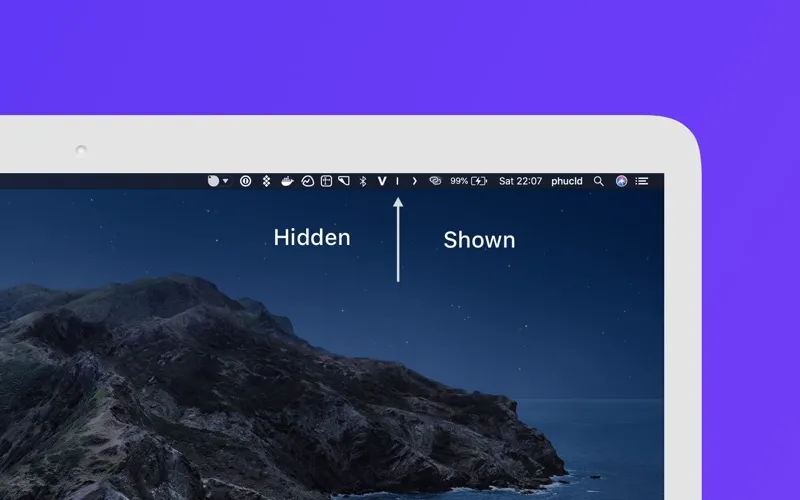
Hidden Bar is a Mac utility that lets you hide menu bar items when you don’t need them. It’s for you if app icons leave your menu bar feeling crowded.
by Dwarves Foundation
What you get
You get a cleaner menu bar without losing access to hidden items.
Hidden Bar gives you a less crowded menu bar by hiding items you don’t need to see all the time. You can bring them back with a global keyboard shortcut, then hide them again when you’re done. That keeps your menu bar visually quieter while leaving those items within reach.
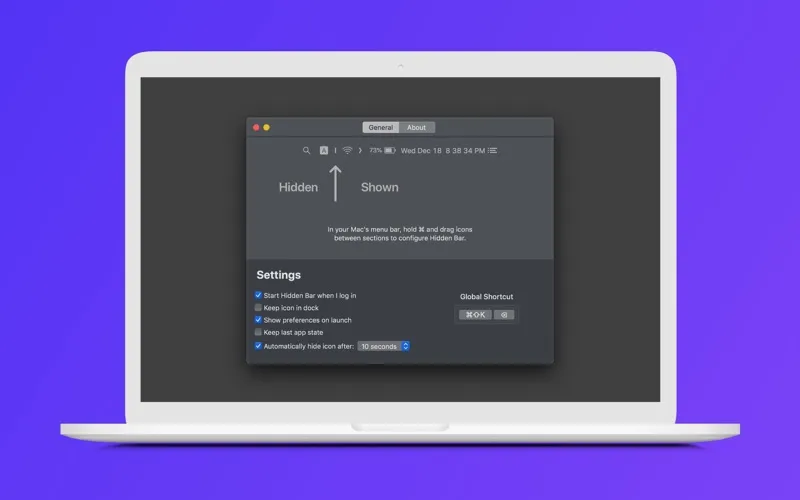
You can also have items hide automatically after 5, 10, 15, 30, or 60 seconds. Choose a short delay to clear them away quickly, or a longer one to give yourself more time before they disappear.
Set Hidden Bar to launch when you log in, and you won’t need to open it manually at the start of each session.
-
Less visible clutter
You can keep menu bar items out of sight when you don’t need them.
-
Access from your keyboard
You can show or hide items with a global shortcut.
-
Automatic cleanup
You can have items hide after one of five delays, from 5 to 60 seconds.
-
Ready when you log in
You can avoid opening Hidden Bar manually by setting it to launch at login.
Best for
- You have a menu bar crowded with app icons
- You want occasional access to items without keeping them visible
- You prefer keyboard control for showing and hiding items
Skip it if
You don’t need it if your menu bar is already uncluttered or you want every item visible all the time.
Screenshots
From the developer
Hidden lets you hide menu bar items to give your Mac a cleaner look. Features: Launch at login Auto-hide after 5/10/15/30/60 seconds Show/hide with global shortcut Full menu bar mode RTL languages supported. If you require any further information or feature, feel free to contact us: [email protected]Read the full description
Alternatives to Hidden Bar
Other apps to tidy up your menu bar. See all
 Bartender
Clean up and superpower your menu bar
Setapp
97% · 15,789 ratings
Bartender
Clean up and superpower your menu bar
Setapp
97% · 15,789 ratings
 One Switch
Access macOS features fast
Setapp
98% · 2,026 ratings
One Switch
Access macOS features fast
Setapp
98% · 2,026 ratings
 MistBar
Tidy menu bar, built-in tools
Sold separately
MistBar
Tidy menu bar, built-in tools
Sold separately
 PeekBar
Rescue your hidden menu bar
Sold separately
PeekBar
Rescue your hidden menu bar
Sold separately
 SaneBar
Private menu bar control
Sold separately
SaneBar
Private menu bar control
Sold separately
 MenubarX
Browse the web from menu bar
Setapp
94% · 272 ratings
MenubarX
Browse the web from menu bar
Setapp
94% · 272 ratings