iLove NTFS
iLove NTFS lets you write to Windows-formatted NTFS drives from your Mac with its Pro version. It’s for you if you need to change files, not just read them.
by 平 吕
What you get
You can add, change, and delete files on NTFS drives from your Mac.
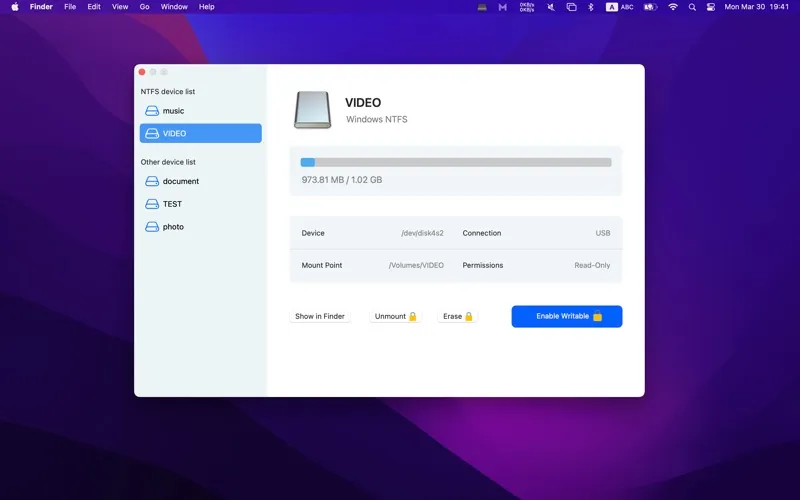
If you connect an NTFS drive to your Mac, you can normally read its files but not change what’s on it. With iLove NTFS Pro, you can write, edit, copy, move, and delete files on those drives. You can save work back to an NTFS device rather than treating it as read-only storage.
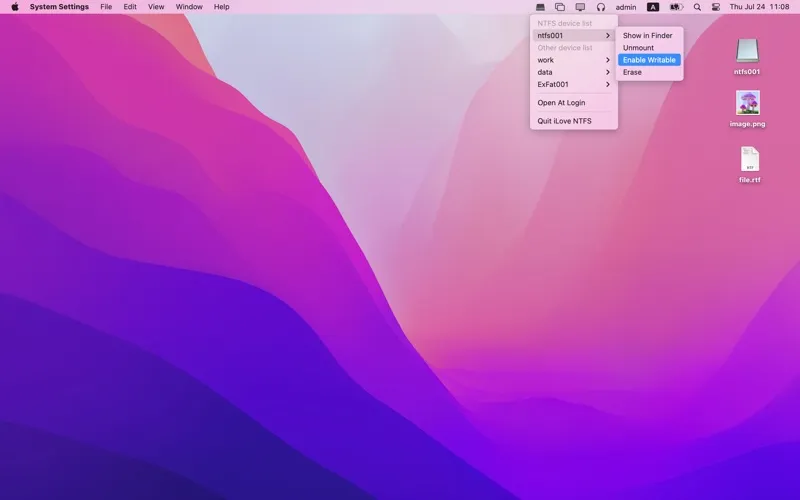
You can also format a device as NTFS when you need that Windows file system. When you finish working, you can use the app’s Unmount command before disconnecting the device, as recommended to help protect your data.
You’ll need the paid Pro version for read/write access, erasing, mounting, and unmounting. The free version only lists connected devices, so it won’t solve your problem if you need to add or change files.
-
Save files to NTFS
With Pro, you can copy files from your Mac onto an NTFS drive instead of only reading what’s there.
-
Change existing drive contents
You can edit, move, and delete files on NTFS volumes with Pro.
-
Prepare NTFS storage
You can format a device as NTFS when you need storage using that file system.
-
Unmount before disconnecting
With Pro, you can unmount your device through the app before unplugging it to help protect your data.
Best for
- You exchange NTFS drives with Windows users
- You need to save changes back to an NTFS drive
- You need to format a device as NTFS from your Mac
Skip it if
You don’t need it if you only read files from NTFS drives or never use NTFS storage.
Screenshots
From the developer
Microsoft NTFS is one of the main file systems for Windows. But if you are a Mac user, you may get annoyed dealing with those NTFS devices as Mac only supports reading data from NTFS devices. It does not allow you to write or delete data. Besides, you cannot format any devices to NTFS format.Read the full description
Alternatives to iLove NTFS
Other apps to work with external drives. See all
 iBoysoft NTFS for Mac
Read/write to NTFS drives
Setapp
87% · 772 ratings
iBoysoft NTFS for Mac
Read/write to NTFS drives
Setapp
87% · 772 ratings
 USB Connection Information
Stop guessing. Start knowing.
Sold separately
USB Connection Information
Stop guessing. Start knowing.
Sold separately
 EaseUS Data Recovery Wizard
Mac App Store
EaseUS Data Recovery Wizard
Mac App Store
 DiskMap
Visual disk map for Mac. Find what's eating your storage in seconds.
Sold separately
DiskMap
Visual disk map for Mac. Find what's eating your storage in seconds.
Sold separately
 Path Finder
Copy, delete, and sync files
Setapp
92% · 1,574 ratings
Path Finder
Copy, delete, and sync files
Setapp
92% · 1,574 ratings