
LanguageTranslator for Xcode
LanguageTranslator for Xcode lets you translate selected text directly in Xcode’s source editor. It’s for you if you work with text in two languages while developing apps.
by Hiroki Ishiura
What you get
Translate selected text in Xcode without moving it to another app.
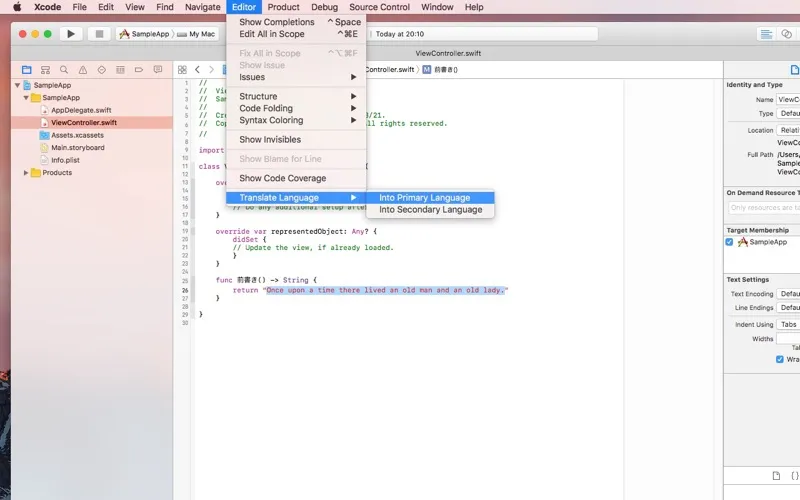
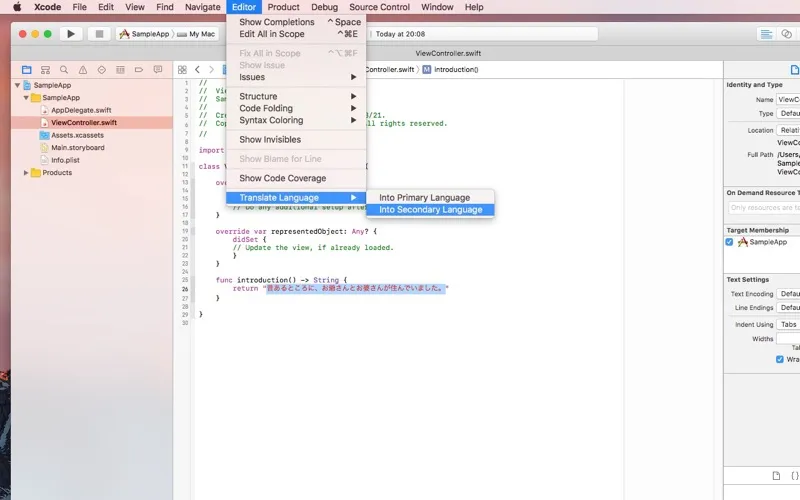
You can replace selected text in Xcode’s source editor with a translation, rather than copying it into a separate translator and pasting the result back. LanguageTranslator for Xcode uses Google’s translation service to convert the text you select.
You choose a primary and secondary language in the app’s settings window. Then, in Xcode’s Translate Language menu, you choose which direction to translate: secondary to primary, or primary to secondary. The translated result replaces your selection in place.
You get a focused tool for working between two languages inside your editor. You’ll need Xcode 14.2 or later to use it.
-
Less copying and pasting
You replace selected text with its translation directly in Xcode’s source editor.
-
Translate in either direction
You can translate from your secondary language to your primary language, or reverse the direction.
-
Choose your language pair
You set the primary and secondary languages in the app’s settings window.
Best for
- You regularly translate text while working in Xcode
- You work between two languages in Apple app projects
Skip it if
You don’t need it if you never translate text inside Xcode or use a version older than 14.2.
Screenshots
From the developer
This application adds two features to Xcode Source Editor. 'Into Primary Language' command in 'Translate Language' translates and replaces the selected text from Secondary Language to Primary Language. 'Into Secondary Language' command is vice versa.Read the full description
Alternatives to LanguageTranslator for Xcode
Other apps to translate text & speech. See all