
Open Any File
Open Any File helps you find installed Mac apps that can open a file. It also gives you technical file details when you need more than a filename.
by Rocky Sand Studio Ltd.
What you get
Find out which apps can open your file.
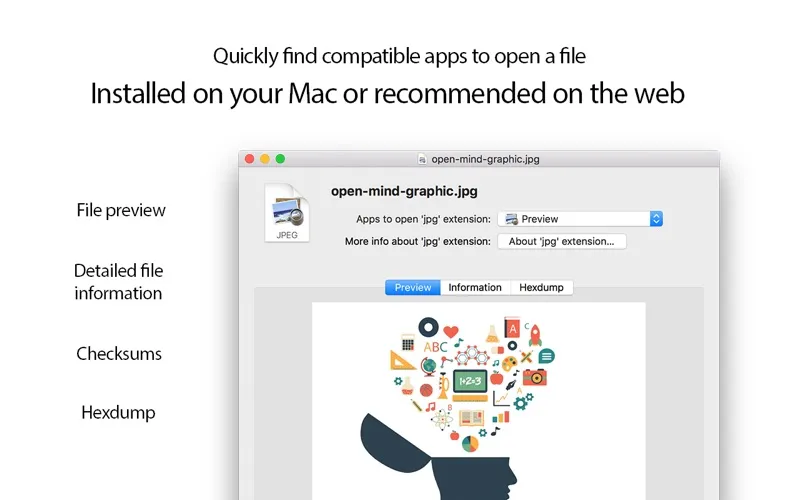
When you encounter an unfamiliar file, you can see which apps already installed on your Mac can open it. Open Any File also gives you a button to search the web, so you have another place to look for answers.
You can bring up the tool from Finder’s control-click menu or Services menu, or drop a file onto its Dock icon. That gives you a way to investigate a file while working with it in Finder.
For a closer inspection, you can view general file information, examine raw contents as a hex dump, and get SHA1, SHA256, MD2, and MD5 checksums. These details help when you need to inspect a file beyond its name and extension.
-
Find a compatible app
You can see which apps installed on your Mac support the file you’re investigating.
-
Investigate files from Finder
You can access the tool through Finder’s control-click or Services menus, or drag a file onto its Dock icon.
-
Inspect raw file contents
You can examine a hex dump when a filename and general information don’t tell you enough.
-
Get file checksums
You can obtain SHA1, SHA256, MD2, and MD5 checksums for your own file comparisons.
Best for
- You encounter unfamiliar file types
- You need to inspect raw file contents or checksums
- You want to check compatible apps from Finder
Skip it if
You probably don’t need it if your files already open in the right apps and you never inspect technical file details.
Screenshots
From the developer
Open Any File shows compatible apps installed on your Mac and helps you to search on the web with the click of a button Open Any File also shows advanced information about your files: Checksums: SHA1, SHA256, MD2, MD5 HEX Dump: raw file content General information Features: Shows the list of install...Read the full description
Alternatives to Open Any File
Other apps to choose which app opens what. See all