
ScreenPlace
Put every window in its place
ScreenPlace is a Mac window manager for you if you regularly rebuild the same app layouts or move between display setups.
by DesignTech SIA
What you get
Keep your windows where you want them without repeatedly resizing and dragging.
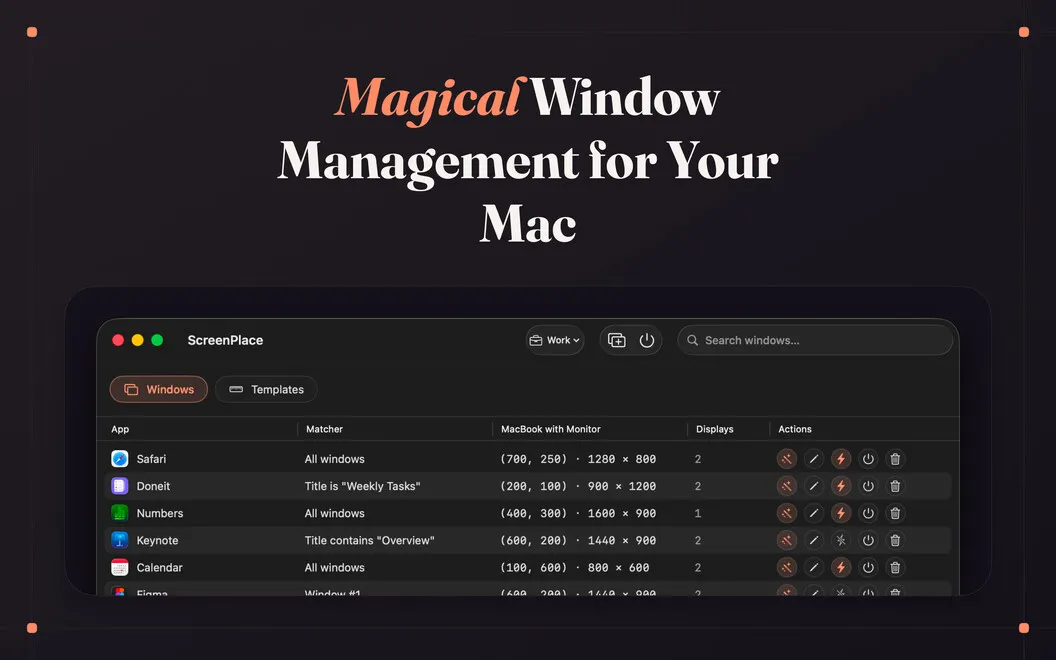
ScreenPlace gives you repeatable window layouts, so you spend less time rebuilding your desktop. You save the sizes and positions you want, group app windows into workspaces, and switch layouts from the menu bar or with a keyboard shortcut. You can keep separate arrangements for writing, meetings, or other tasks.
When you move a window out of place, you can restore it with one click using a small floating badge, or save its new position instead. The badge hides when your windows match the saved arrangement. With auto-apply enabled, you can also have windows move into their saved positions as apps open.
If you use multiple displays, you can save positions for each display and have the appropriate layout apply when you connect it. You get your familiar arrangement back without manually dragging each window into place.
-
Restore misplaced windows
You can return a moved window to its saved size and position with one click.
-
Switch task layouts
You can move between saved workspace arrangements using the menu bar or a keyboard shortcut.
-
Reconnect without rearranging
You can have saved window positions apply when you connect a display.
-
Start with windows arranged
You can have windows take their saved positions when apps open, rather than resizing them each time.
Best for
- You repeatedly arrange the same app windows
- You switch between writing, meetings, and other work setups
- You regularly connect an external display
Skip it if
You probably don't need it if you rarely rearrange windows or are satisfied with your Mac's built-in window controls.
Screenshots




From the developer
ScreenPlace is a window manager for Mac. It remembers exactly where every window belongs, then puts each one back in its place automatically. Group your apps into workspaces, save layouts you reuse often, and switch between them with a keyboard shortcut. Set it up once, and your windows stay right where you want them.Read the full description
Alternatives to ScreenPlace
Other apps to manage windows & spaces. See all
 Supercharge
 your Mac
Setapp
100% · 842 ratings
Supercharge
Supercharge your Mac
Setapp
100% · 842 ratings
 Mosaic
Automatically organize windows
Setapp
92% · 2,600 ratings
Mosaic
Automatically organize windows
Setapp
92% · 2,600 ratings
 Swish
Set up quick trackpad actions
Setapp
97% · 1,040 ratings
Swish
Set up quick trackpad actions
Setapp
97% · 1,040 ratings
 Lasso
Manage windows on macOS
Setapp
98% · 176 ratings
Lasso
Manage windows on macOS
Setapp
98% · 176 ratings
 Slidepad
Keep most used apps at hand
Setapp
92% · 520 ratings
Slidepad
Keep most used apps at hand
Setapp
92% · 520 ratings
 Mission Control Plus
Close windows from Mission Control
Setapp
97% · 1,077 ratings
Mission Control Plus
Close windows from Mission Control
Setapp
97% · 1,077 ratings