
Supercharge
Supercharge your Mac
Supercharge is a macOS utility for you if you want fewer steps when managing files, switching apps, and adjusting everyday Mac behavior, especially after moving from Windows.
by Sindre Sorhus · 100% positive (842)
What you get
You get quicker file moves, easier app switching, and fewer accidental quits.
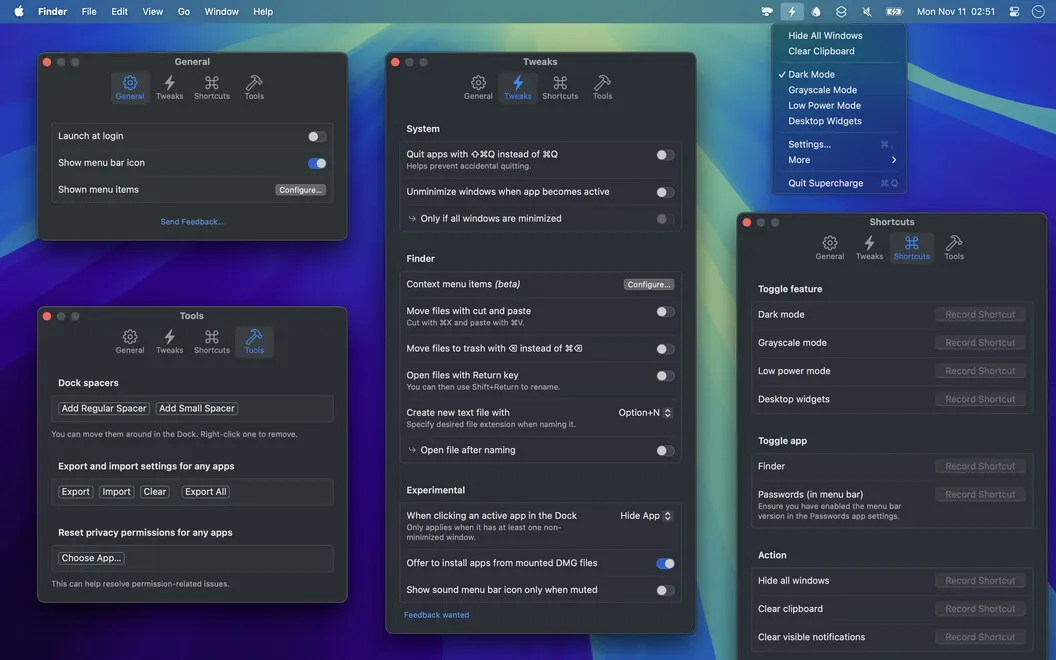
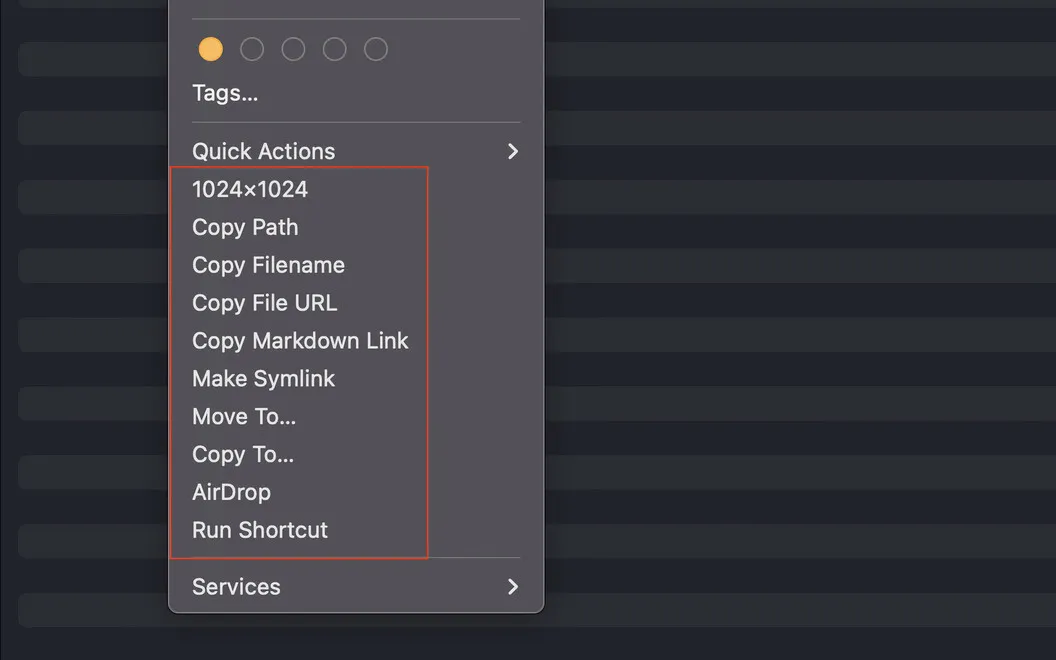
Supercharge gives you more direct ways to handle everyday Mac tasks. In Finder, you can copy file paths, move files, send items through AirDrop, or open Terminal from the right-click menu. You can also use Command + X to cut files for moving, making file management more familiar if you previously used Windows.
When you switch apps with Command + Tab, minimized apps can come back into view without you searching for their windows. You can close windows directly from Mission Control and require confirmation before quitting an app to help prevent accidental exits.
You can group Dock icons with spacers, dim hidden apps, and clear all notifications at once. Predefined keyboard shortcuts also let you toggle settings such as Dark Mode and Low Power Mode without opening settings each time.
-
Fewer file-management steps
You can move files with Command + X and reach file paths, AirDrop, and Terminal through Finder’s right-click menu.
-
Recover minimized windows
You can bring minimized apps back into view when switching with Command + Tab, rather than hunting for their windows.
-
Avoid accidental quits
You can require confirmation before an app quits, giving you a chance to catch a mistaken action.
-
Make your Dock clearer
You can separate apps into groups with spacers and dim hidden apps so their status is easier to recognize.
-
Clear notification clutter
You can dismiss all notifications at once instead of clearing them individually.
Best for
- You’ve switched from Windows and miss cutting files with Command + X.
- You frequently switch between apps with minimized windows.
- You want quicker access to routine Finder actions and Mac settings.
Skip it if
You probably don’t need it if Finder, app switching, and the Dock already behave the way you want.
Screenshots
From the developer
Ever feel like your Mac could do more, especially when you switch from Windows? With Supercharge, it can. This powerful utility enhances your Mac experience, making it more like the multitasking machine you’ve always wanted. Advanced Finder context menu Supercharge enhances your Finder with a robust context menu.Read the full description
Alternatives to Supercharge
Other apps to manage windows & spaces. See all
 Mosaic
Automatically organize windows
Setapp
92% · 2,600 ratings
Mosaic
Automatically organize windows
Setapp
92% · 2,600 ratings
 Swish
Set up quick trackpad actions
Setapp
97% · 1,040 ratings
Swish
Set up quick trackpad actions
Setapp
97% · 1,040 ratings
 Lasso
Manage windows on macOS
Setapp
98% · 176 ratings
Lasso
Manage windows on macOS
Setapp
98% · 176 ratings
 Slidepad
Keep most used apps at hand
Setapp
92% · 520 ratings
Slidepad
Keep most used apps at hand
Setapp
92% · 520 ratings
 Mission Control Plus
Close windows from Mission Control
Setapp
97% · 1,077 ratings
Mission Control Plus
Close windows from Mission Control
Setapp
97% · 1,077 ratings
 Contain
Bring your Mac windows together in tabs
Sold separately
Contain
Bring your Mac windows together in tabs
Sold separately