
GapSucker
One cursor, zero dead ends
GapSucker is a cursor manager for your multi-monitor Mac setup, helping you move between displays when their edges don't line up.
by Ryan Clare
What you get
Move your cursor between misaligned screens without getting stuck at the edges.
You can move your cursor from one display to another without detouring around gaps in their alignment. GapSucker automatically carries your pointer across those gaps, so you don't have to hunt for the part of the edge where your screens connect. That helps when you have a portrait monitor beside a landscape display, stacked screens, or monitors at different heights.
You still get a predictable boundary where there's no neighboring display: the cursor only jumps when another screen is on the other side. You can keep your existing arrangement rather than repositioning screens just to make pointer movement easier.
When you connect another display, GapSucker adapts automatically. You can turn it on or off, or refresh its view of your screen layout, from the menu bar. It runs in the background without needing a preferences window for those controls.
-
Avoid cursor dead ends
You can cross gaps between misaligned displays instead of searching for a passable section of the edge.
-
Keep your preferred layout
You can use portrait, landscape, stacked, or unevenly positioned screens without rearranging them for easier cursor movement.
-
Keep empty edges predictable
Your cursor only crosses an edge when a neighboring display exists, avoiding jumps toward empty space.
-
Adjust without digging
You can enable, disable, or refresh screen detection directly from the menu bar.
Best for
- You use portrait and landscape monitors together
- Your displays sit at different heights
- You regularly connect additional displays
Skip it if
You don't need it if you use one display or never get your cursor stuck between screens.
Screenshots
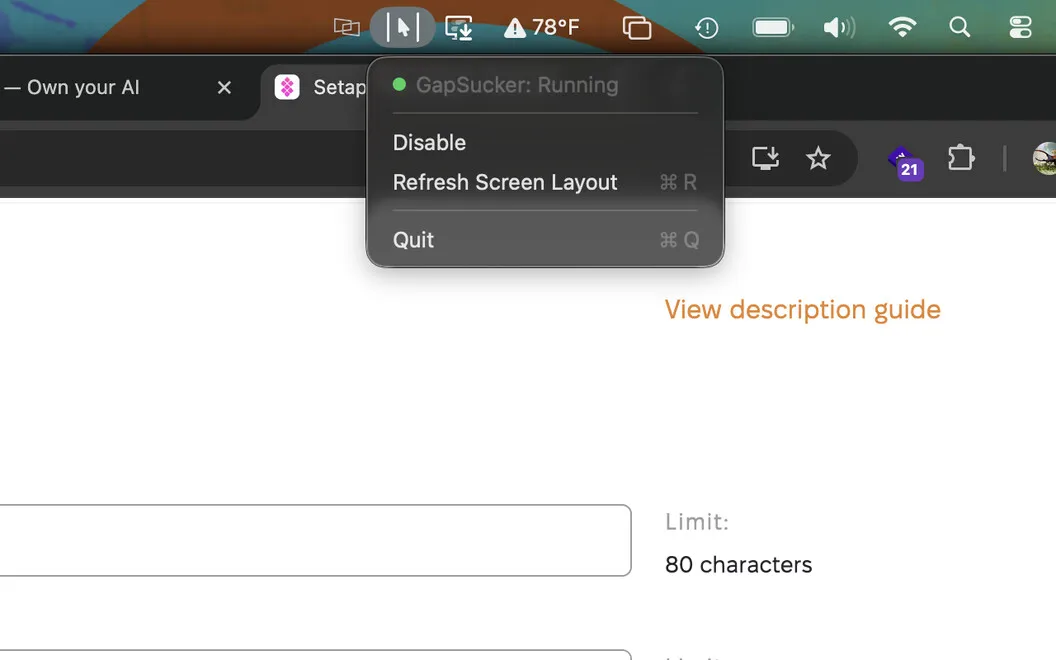
From the developer
GapSucker — cursor manager for multi-monitor Mac setups. When your displays don't physically line up, your cursor gets stuck at the edges — GapSucker fixes that by automatically warping it across the gaps. Move from screen to screen as if the bezels aren't even there.Read the full description
Alternatives to GapSucker
Other apps to control external displays & brightness. See all
 DisplayBuddy
Control settings across monitors
Setapp
91% · 1,108 ratings
DisplayBuddy
Control settings across monitors
Setapp
91% · 1,108 ratings
 Vivid
Double display brightness
Setapp
85% · 445 ratings
Vivid
Double display brightness
Setapp
85% · 445 ratings
 LG Screen Manager (LG Monitor)
Mac App Store
LG Screen Manager (LG Monitor)
Mac App Store
 MonitorControl Lite
Mac App Store
MonitorControl Lite
Mac App Store
 Evenlight
Control app’s brightness
Setapp
85% · 33 ratings
Evenlight
Control app’s brightness
Setapp
85% · 33 ratings
 Slidr
Trackpad controls for Mac
Sold separately
Slidr
Trackpad controls for Mac
Sold separately