WhatFont
You can use WhatFont, a Safari extension for Mac, to identify website fonts and inspect typography when designing or developing sites.
by Chengyin Liu
What you get
Find out which fonts a website uses and copy their CSS.
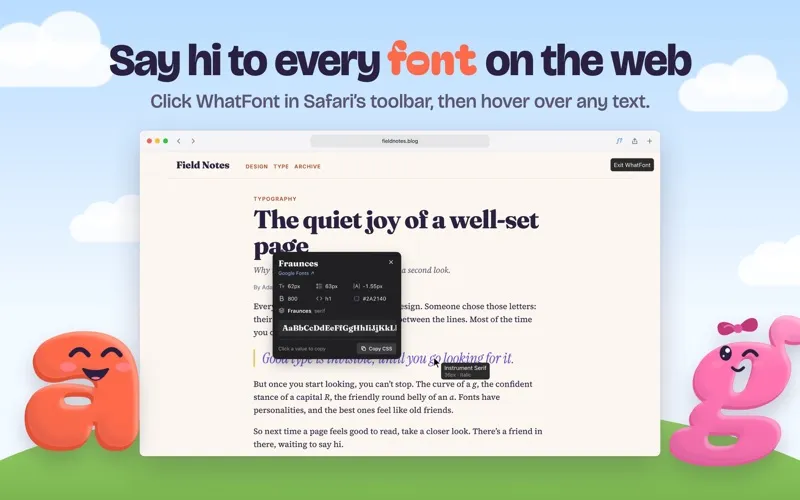
With WhatFont, you can identify text on a web page without guessing its typeface. Activate it in Safari’s toolbar, then hover over text to see the font name. Click to inspect its source, size, weight, line height, letter spacing, and color. You can also see which font in the page’s font stack is actually being used.
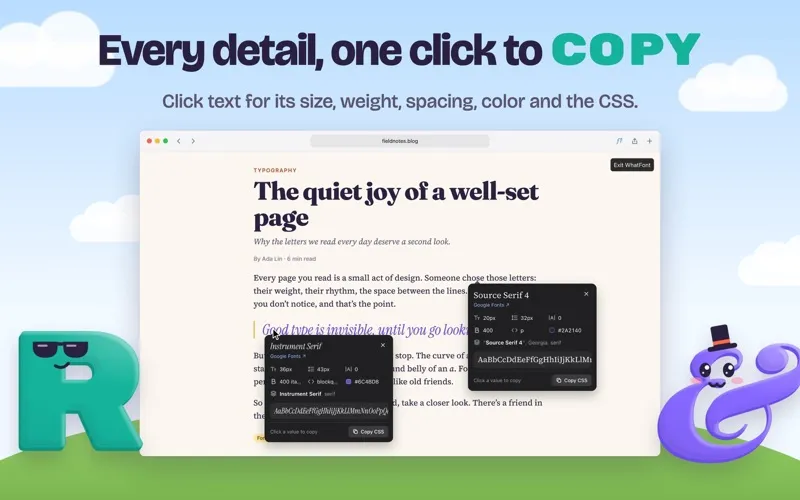
When you find typography you want to reference, you can copy individual values or all the CSS at once. Keep multiple inspection panels open to compare text styles side by side, whether you’re checking your own site or studying another page’s design.
You control when the extension reads a page: it only does so after you activate it there. You don’t need an account, and your use isn’t tracked or collected.
-
Identify fonts on sight
You can hover over website text to learn its font name, then click to see where it comes from.
-
Check exact text styling
You can inspect size, weight, spacing, line height, and color rather than estimating them by eye.
-
Reuse values without retyping
You can copy a single styling value or all the CSS at once for reference in your work.
-
Compare typography side by side
You can leave several inspection panels open to compare fonts and text styles on a page.
-
Keep page access deliberate
You choose when a page is read, without granting access to every website or creating an account.
Best for
- You design websites and want to identify typography you encounter.
- You develop sites and need to check which font is actually displayed.
- You want exact text colors and styling values from pages in Safari.
Skip it if
You don’t need it if you never inspect website typography or don’t use Safari on your Mac.
Screenshots

From the developer
WhatFont is the quickest way to identify fonts on web pages, right inside Safari on your Mac. Click WhatFont in the Safari toolbar, then hover over any text to see its font.Read the full description
Alternatives to WhatFont
Other apps to build & debug websites. See all